Custom Setting Types
When none of the built in setting types fits, you can add your own. A setting type has up to three parts:
- A PHP class that declares the type and its options, used in block and section schemas.
- An editor field, the input shown in the settings panel for that type.
- An optional transformer that turns the stored value into what your Blade views receive.
This page builds a star rating setting.
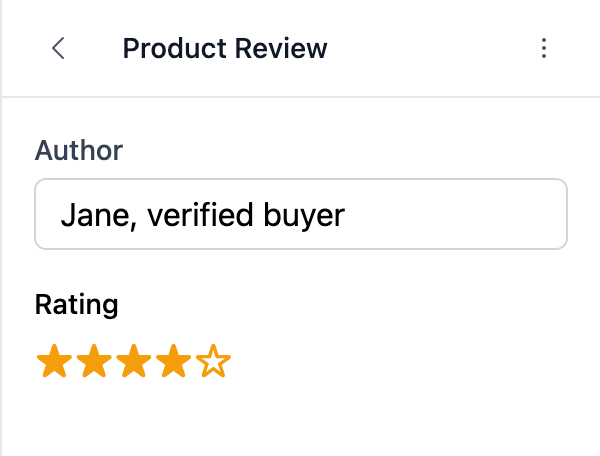
The Setting Class
Extend BagistoPlus\Visual\Settings\Base and give the type a name:
namespace App\Visual\Settings;

use BagistoPlus\Visual\Settings\Base;

class StarRating extends Base
{
    protected static string $type = 'star_rating';

    public function max(int $max): static
    {
        $this->meta['max'] = $max;

        return $this;
    }
}
Everything you put in $this->meta reaches the editor field as a key of field. Here, max(5) gives the field field.max === 5. The methods of Base all work on your type too, such as default(), info(), localized() and visibleIf().
Use it in a schema like any other setting:
use App\Visual\Settings\StarRating;
use BagistoPlus\Visual\Settings\Text;

public static function settings(): array
{
    return [
        Text::make('author', 'Author'),
        StarRating::make('rating', 'Rating')->max(5)->default(4),
    ];
}
The class can live anywhere your app autoloads. Visual does not need it to be registered.
The Editor Field
Register a field for the type in your editor script. See Loading Editor Assets to load it.
import StarRatingField from './StarRatingField.vue';

document.addEventListener('visual:editor:ready', (event) => {
  const { editor } = event.detail;

  editor.ui.registerPropertyField({
    type: 'star_rating',
    render: StarRatingField,
  });
});
type must match the $type of your PHP class. Without a registered field, the settings panel shows "Unknown field type" in place of the input.
The field is a Vue component used with v-model. It receives:
field: the setting as declared in PHP, withid,label,default,infoand your own options such asmax.modelValue: the current value. It can be empty, for example on a block saved before the setting existed, so fall back tofield.default.
It emits update:modelValue with the new value. The preview updates and the value is saved to the draft right away.
<!-- StarRatingField.vue -->
<script setup>
import { computed } from 'vue';

const props = defineProps({
  field: Object,
  modelValue: Number,
});

const emit = defineEmits(['update:modelValue']);

const stars = computed(() => props.field.max ?? 5);
const current = computed(() => props.modelValue ?? props.field.default ?? 0);
</script>

<template>
  <div class="star-rating">
    <label>{{ field.label }}</label>
    <div>
      <button
        v-for="n in stars"
        :key="n"
        type="button"
        :aria-pressed="n <= current"
        @click="emit('update:modelValue', n)"
      >
        {{ n <= current ? '★' : '☆' }}
      </button>
    </div>
  </div>
</template>
The field renders its own label. The settings panel only adds the info text below it.
Plain DOM Field
render can also be a function. It receives { field, value, onChange } and returns an element:
editor.ui.registerPropertyField({
  type: 'star_rating',
  render: ({ field, value, onChange }) => {
    const input = document.createElement('input');
    input.type = 'number';
    input.min = 0;
    input.max = field.max ?? 5;
    input.value = value ?? field.default ?? 0;
    input.addEventListener('change', () => onChange(Number(input.value)));

    return input;
  },
});
The Transformer
Without a transformer, your views receive the stored value as it is. A transformer lets you clean it up or turn it into an object. It implements SettingTransformerInterface:
namespace App\Visual\Settings;

use BagistoPlus\Visual\Contracts\SettingTransformerInterface;

class StarRatingTransformer implements SettingTransformerInterface
{
    public function transform(mixed $value, array $schema = []): int
    {
        $max = $schema['max'] ?? 5;

        return max(0, min($max, (int) ($value ?? $schema['default'] ?? 0)));
    }
}
$schema is the setting as declared, the same data the editor field receives as field.
Register it for the type in a service provider's boot method:
use App\Visual\Settings\StarRatingTransformer;
use BagistoPlus\Visual\Facades\Visual;

public function boot(): void
{
    Visual::registerSettingTransformer('star_rating', new StarRatingTransformer);
}
The transformer runs when the block renders. The stored value is not changed, so a rating of 9 saved through the editor API is still 9 in the data, and the view receives 5.
Using the Value
In the view, read the setting like any other:
<div {{ $section->editor_attributes }}>
    <p>{{ $section->settings->author }}</p>
    <p>{{ str_repeat('★', $section->settings->rating) }}</p>
</div>