Presets
Presets provide pre-configured templates for both blocks and sections, allowing merchants to quickly add common variations without manual configuration. Think of them as "starter templates" or "quick-start options" that appear in the theme editor.
You can define presets in two ways:
- Inline: Using the
presets()method directly in your block/section class - Standalone: Creating dedicated preset classes that extend
Preset
What Are Presets?
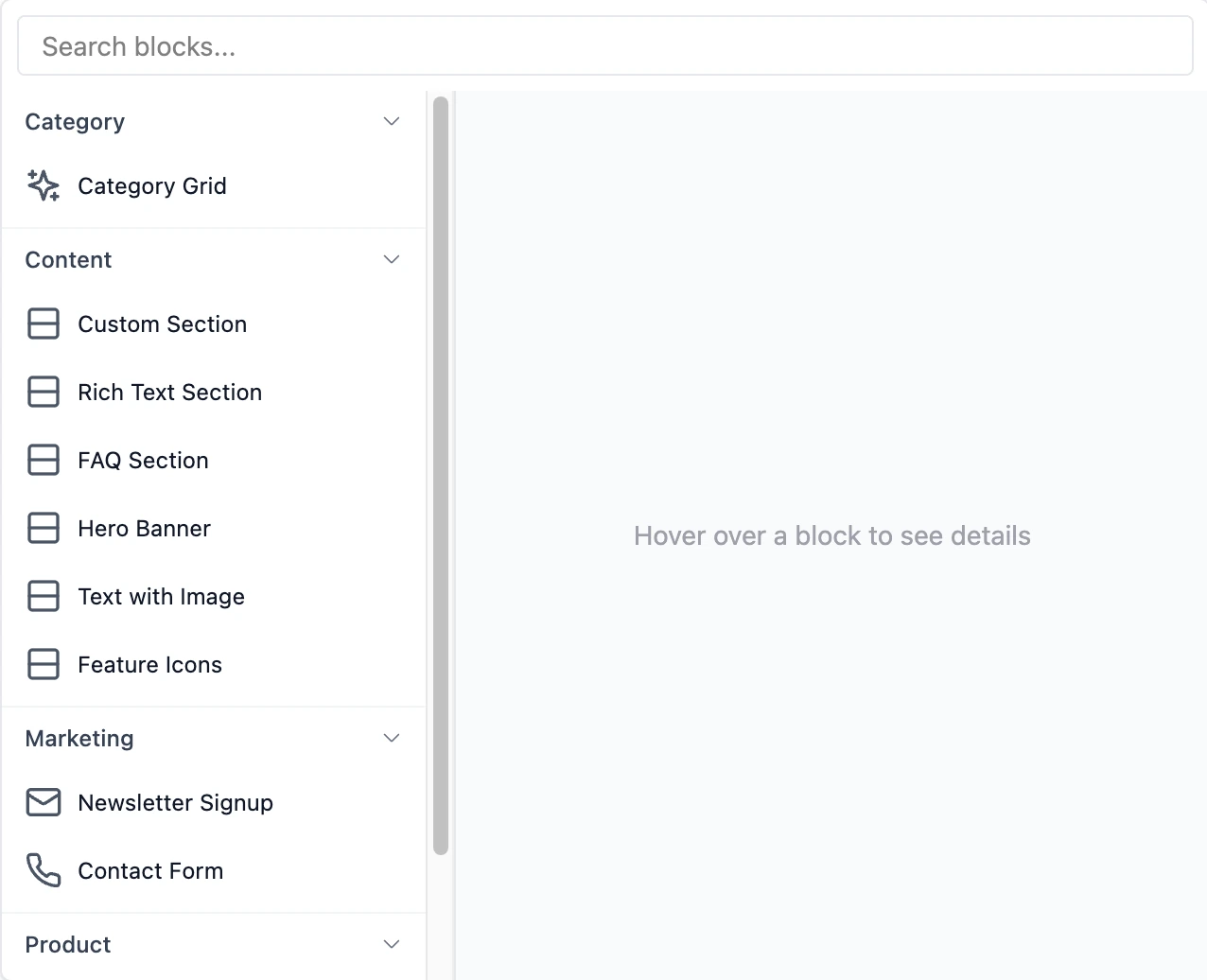
When merchants add a block or section in the Visual theme editor, they can choose from a list of presets - pre-configured variations with different settings, layouts, and child blocks already set up.
Why Use Presets?
✅ Faster setup - Merchants get started quickly with sensible defaults
✅ Better UX - Guide merchants toward common patterns
✅ Consistency - Ensure brand-aligned variations
✅ Discoverability - Show what's possible with your blocks/sections
Basic Presets
Define presets by overriding the presets() method:
<?php

namespace Themes\YourTheme\Blocks;

use BagistoPlus\Visual\Blocks\SimpleBlock;
use BagistoPlus\Visual\Settings\Text;
use BagistoPlus\Visual\Settings\Select;
use BagistoPlus\Visual\Support\Preset;
use function BagistoPlus\Visual\t;

class Button extends SimpleBlock
{
    protected static string $view = 'shop::blocks.button';

    public static function settings(): array
    {
        // ...
    }

    public static function presets(): array
    {
        return [
            Preset::make(t('your-theme::presets.primary_cta.name'))
                ->settings([
                    'text' => t('your-theme::presets.primary_cta.text'),
                    'style' => 'primary',
                    'size' => 'large',
                ]),
        ];
    }
}
Preset Structure
Each preset can have these properties:
| Property | Type | Description |
|---|---|---|
name | string | Required. Display name in theme editor |
description | string | Optional description shown to merchants |
icon | string | Icon identifier (e.g., heroicon-o-star) |
category | string | Group presets into categories |
previewImageUrl | string | URL to preview image |
settings | array | Default settings values (block settings) |
children | array | Default child blocks (for containers/sections) |
Example
use BagistoPlus\Visual\Support\Preset;
use function BagistoPlus\Visual\t;

public static function presets(): array
{
    return [
        Preset::make(t('your-theme::presets.alerts.success.name'))
            ->description(t('your-theme::presets.alerts.success.description'))
            ->icon('heroicon-o-check-circle')
            ->category(t('your-theme::presets.categories.alerts'))
            ->previewImageUrl('/images/presets/success-alert.png')
            ->settings([
                'message' => t('your-theme::presets.alerts.success.message'),
                'type' => 'success',
                'dismissible' => true,
            ]),

        Preset::make(t('your-theme::presets.alerts.error.name'))
            ->description(t('your-theme::presets.alerts.error.description'))
            ->icon('heroicon-o-x-circle')
            ->category(t('your-theme::presets.categories.alerts'))
            ->settings([
                'message' => t('your-theme::presets.alerts.error.message'),
                'type' => 'error',
                'dismissible' => true,
            ]),
    ];
}
Presets with Child Blocks
Sections and container blocks can include pre-configured child blocks in their presets:
Section Preset with Child Blocks
use BagistoPlus\Visual\Support\Preset;
use BagistoPlus\Visual\Support\PresetBlock;
use function BagistoPlus\Visual\t;

public static function presets(): array
{
    return [
        Preset::make(t('your-theme::presets.hero_cta.name'))
            ->description(t('your-theme::presets.hero_cta.description'))
            ->icon('heroicon-o-photograph')
            ->category(t('your-theme::presets.categories.banners'))
            ->settings([
                'layout' => 'centered',
                'background_color' => '#4f46e5',
            ])
            ->blocks([
                PresetBlock::make('heading')
                    ->id('hero-title')
                    ->settings([
                        'text' => t('your-theme::presets.hero_cta.heading'),
                        'level' => 1,
                    ]),

                PresetBlock::make('paragraph')
                    ->id('hero-subtitle')
                    ->settings([
                        'text' => t('your-theme::presets.hero_cta.subtitle'),
                    ]),

                PresetBlock::make('button')
                    ->id('hero-cta')
                    ->settings([
                        'text' => t('your-theme::presets.hero_cta.button'),
                        'style' => 'primary',
                    ]),
            ]),

        Preset::make(t('your-theme::presets.hero_signup.name'))
            ->description(t('your-theme::presets.hero_signup.description'))
            ->icon('heroicon-o-mail')
            ->category(t('your-theme::presets.categories.banners'))
            ->settings([
                'layout' => 'centered',
            ])
            ->blocks([
                PresetBlock::make('heading')
                    ->settings(['text' => t('your-theme::presets.hero_signup.heading')]),

                PresetBlock::make('paragraph')
                    ->settings(['text' => t('your-theme::presets.hero_signup.subtitle')]),

                PresetBlock::make('email-input'),
                PresetBlock::make('button')
                    ->settings(['text' => t('your-theme::presets.hero_signup.button')]),
            ]),
    ];
}
PresetBlock API
When defining child blocks in presets, use PresetBlock::make():
use function BagistoPlus\Visual\t;

PresetBlock::make('button')
    ->id('unique-id')                    // Semantic ID
    ->name(t('your-theme::presets.blocks.button.name')) // Display name in editor
    ->settings([...])                     // Block settings values
    ->static()                            // Lock from editing
    ->keepInTree()                        // Stay in the editor tree when not rendered
    ->children([...])                     // Nested child blocks
    ->order(['id1', 'id2'])              // Rendering order
Dynamic Sources in Presets
Settings values in presets can use dynamic sources to resolve from runtime context:
PresetBlock::make('@awesome-theme/product-card')
    ->id('grid-card')
    ->static()
    ->settings([
        'productName' => '@product.name',        // Resolves from context
        'price' => '@product.price',
        'image' => '@product.base_image.url',
    ])
    ->children([
        PresetBlock::make('@awesome-theme/product-image')
            ->settings([
                'src' => '@product.base_image.url',
                'alt' => '@product.name',
            ]),
        PresetBlock::make('@awesome-theme/product-title')
            ->settings([
                'text' => '@product.name',
                'url' => '@product.url',
            ]),
    ])
The @ prefix enables blocks to access:
- Page context (variables passed from controllers)
- Parent-shared data (via
share()method) - Model properties using dot notation
This is especially useful for static blocks that need to display different data based on loop context.
Learn more: Dynamic Sources
PresetBlock Methods
| Method | Description |
|---|---|
type(string) | Block type (e.g., 'button', 'heading') |
id(string) | Unique semantic ID for the block |
name(string) | Custom display name in editor |
settings(array) | Block settings values |
static(bool) | Mark as static (non-editable by merchant) |
keepInTree(bool) | Keep the block in the editor tree when the template does not render it |
children(array) | Nested child blocks |
order(array) | Order of child block IDs |
keepInTree() only matters for static or repeated blocks that a template renders conditionally. See Keeping a Hidden Block in the Tree.
Reusable Preset Classes
For reusable, shareable, or complex presets, you can define them as standalone classes instead of inline arrays. This approach is particularly useful for:
- Theme-wide presets shared across multiple blocks/sections
- Complex configurations with deep nesting
- Reusable templates across different themes
- Version-controlled presets maintained separately
Creating a Standalone Preset Class
Standalone preset classes extend BagistoPlus\Visual\Support\Preset and implement two key methods:
<?php

namespace Themes\YourTheme\Presets;

use BagistoPlus\Visual\Support\Preset;
use BagistoPlus\Visual\Support\PresetBlock;
use function BagistoPlus\Visual\t;

class HeroBanner extends Preset
{
    /**
     * Specify which block or section this preset is for
     */
    protected function getType(): string
    {
        return '@your-theme/hero-section';
    }

    /**
     * Configure the preset
     */
    protected function build(): void
    {
        $this
            ->name(t('your-theme::presets.hero_banner.name'))
            ->description(t('your-theme::presets.hero_banner.description'))
            ->icon('heroicon-o-photograph')
            ->category(t('your-theme::presets.categories.banners'))
            ->settings([
                'layout' => 'centered',
                'background_color' => '#4f46e5',
                'padding' => 'large',
            ])
            ->blocks([
                PresetBlock::make('@your-theme/heading')
                    ->id('hero-title')
                    ->settings([
                        'text' => t('your-theme::presets.hero_banner.heading'),
                        'level' => 1,
                        'color' => 'white',
                    ]),

                PresetBlock::make('@your-theme/paragraph')
                    ->id('hero-subtitle')
                    ->settings([
                        'text' => t('your-theme::presets.hero_banner.subtitle'),
                        'color' => 'white',
                    ]),

                PresetBlock::make('@your-theme/button')
                    ->id('hero-cta')
                    ->settings([
                        'text' => t('your-theme::presets.hero_banner.button'),
                        'style' => 'primary',
                        'size' => 'large',
                    ]),
            ]);
    }
}
Using PresetBlock
Always use PresetBlock from the Visual package when defining child blocks in presets:
use BagistoPlus\Visual\Support\Preset;
use BagistoPlus\Visual\Support\PresetBlock;
use function BagistoPlus\Visual\t;

public static function presets(): array
{
    return [
        Preset::make(t('your-theme::presets.hero_banner.name'))
            ->blocks([
                PresetBlock::make('heading')
                    ->settings(['text' => t('your-theme::presets.hero_banner.heading')]),

                PresetBlock::make('button')
                    ->settings(['text' => t('your-theme::presets.hero_banner.button')]),
            ]),
    ];
}
The block type identifier can be:
- Simple name:
'button','heading'(for built-in or theme blocks) - Namespaced:
'@your-theme/button','@visual-debut/heading'(explicit namespace)
Example: Complex Nested Preset
<?php

namespace Themes\YourTheme\Presets;

use BagistoPlus\Visual\Support\Preset;
use BagistoPlus\Visual\Support\PresetBlock;
use function BagistoPlus\Visual\t;

class FeatureGrid extends Preset
{
    protected function getType(): string
    {
        return '@your-theme/flex-section';
    }

    protected function build(): void
    {
        $this
            ->name(t('your-theme::presets.feature_grid.name'))
            ->description(t('your-theme::presets.feature_grid.description'))
            ->category(t('your-theme::presets.categories.content'))
            ->settings([
                'layout' => 'grid',
                'columns' => 3,
            ])
            ->blocks([
                // First feature
                PresetBlock::make('@your-theme/container')
                    ->id('feature-1')
                    ->settings(['alignment' => 'center'])
                    ->children([
                        PresetBlock::make('@your-theme/icon')
                            ->settings([
                                'icon' => 'heroicon-o-lightning-bolt',
                                'size' => 'large',
                            ]),
                        PresetBlock::make('@your-theme/heading')
                            ->settings([
                                'text' => t('your-theme::presets.feature_grid.fast_shipping.title'),
                                'level' => 3,
                            ]),
                        PresetBlock::make('@your-theme/paragraph')
                            ->settings([
                                'text' => t('your-theme::presets.feature_grid.fast_shipping.text'),
                            ]),
                    ]),

                // Second feature
                PresetBlock::make('@your-theme/container')
                    ->id('feature-2')
                    ->settings(['alignment' => 'center'])
                    ->children([
                        PresetBlock::make('@your-theme/icon')
                            ->settings([
                                'icon' => 'heroicon-o-shield-check',
                                'size' => 'large',
                            ]),
                        PresetBlock::make('@your-theme/heading')
                            ->settings([
                                'text' => t('your-theme::presets.feature_grid.secure_checkout.title'),
                                'level' => 3,
                            ]),
                        PresetBlock::make('@your-theme/paragraph')
                            ->settings([
                                'text' => t('your-theme::presets.feature_grid.secure_checkout.text'),
                            ]),
                    ]),

                // Third feature
                PresetBlock::make('@your-theme/container')
                    ->id('feature-3')
                    ->settings(['alignment' => 'center'])
                    ->children([
                        PresetBlock::make('@your-theme/icon')
                            ->settings([
                                'icon' => 'heroicon-o-heart',
                                'size' => 'large',
                            ]),
                        PresetBlock::make('@your-theme/heading')
                            ->settings([
                                'text' => t('your-theme::presets.feature_grid.satisfaction.title'),
                                'level' => 3,
                            ]),
                        PresetBlock::make('@your-theme/paragraph')
                            ->settings([
                                'text' => t('your-theme::presets.feature_grid.satisfaction.text'),
                            ]),
                    ]),
            ]);
    }
}
Organizing Preset Classes
Store standalone preset classes in a dedicated directory:
your-theme/
└── src/
    └── Presets/
        ├── HeroBanner.php
        ├── FeatureGrid.php
        ├── TestimonialCarousel.php
        └── ClassicFooter.php
Registering Standalone Presets
Bagisto Visual automatically discovers standalone preset classes from:
app/Visual/Presetspackages/<Vendor>/<Theme>/src/Presets
For other locations, you can manually register presets in a service provider:
Discover a directory
Use discoverPresetsIn() to auto-discover all preset classes in a directory. The method requires two parameters:
- The directory path containing your preset classes
- The base namespace for those presets (defaults to
'App\\Presets')
Visual::discoverPresetsIn(
    base_path('modules/Shared/Presets'),
    'Modules\\Shared\\Presets'
);
This will automatically discover and register all preset classes in the specified directory, matching the namespace structure to the folder structure.
When to Use Standalone Preset Classes
| Use Standalone Classes When | Use Inline presets() Method When |
|---|---|
| Preset is complex with deep nesting | Preset is simple (2-3 properties) |
| Preset is reused across themes | Preset is specific to one block |
Preset needs to be reused in other presets (::asChild()) | Preset is only used inline |
| Preset requires translations | Preset uses static values |
| Preset is version-controlled separately | Preset is quick variations |
| Multiple presets share logic | Variations are straightforward |
Reusing Presets with ::asChild()
Standalone preset classes can be reused as child blocks within other presets using the ::asChild() method. This enables composition and eliminates duplication when the same preset configuration needs to appear in multiple places.
Basic Usage
<?php

namespace Themes\YourTheme\Presets;

use BagistoPlus\Visual\Support\Preset;
use BagistoPlus\Visual\Support\PresetBlock;
use function BagistoPlus\Visual\t;

// Define a reusable preset
class ProductCard extends Preset
{
    protected function getType(): string
    {
        return '@your-theme/product-card';
    }

    protected function build(): void
    {
        $this
            ->name(t('your-theme::presets.product_card_overlay.name'))
            ->category(t('your-theme::presets.categories.products'))
            ->blocks([
                PresetBlock::make('@your-theme/product-image')
                    ->settings(['aspect_ratio' => 'square']),

                PresetBlock::make('@your-theme/product-title')
                    ->settings(['size' => 'large']),

                PresetBlock::make('@your-theme/product-price')
                    ->settings(['show_compare' => true]),
            ]);
    }
}

// Reuse it in another preset
class ProductGrid extends Preset
{
    protected function getType(): string
    {
        return '@your-theme/product-grid';
    }

    protected function build(): void
    {
        $this
            ->name(t('your-theme::presets.featured_products_grid.name'))
            ->settings(['columns' => 4])
            ->blocks([
                PresetBlock::make('@your-theme/heading')
                    ->settings(['text' => t('your-theme::presets.featured_products_grid.heading')]),

                // Reuse ProductCard preset as a child block
                ProductCard::asChild()
                    ->id('product-card')
                    ->static()
                    ->repeated(),
            ]);
    }
}
Real-World Examples
Example 1: Testimonials Section
use BagistoPlus\Visual\Support\Preset;
use BagistoPlus\Visual\Support\PresetBlock;
use function BagistoPlus\Visual\t;

public static function presets(): array
{
    return [
        Preset::make(t('your-theme::presets.testimonials_grid.name'))
            ->description(t('your-theme::presets.testimonials_grid.description'))
            ->icon('heroicon-o-chat-bubble-left-right')
            ->category(t('your-theme::presets.categories.social_proof'))
            ->settings([
                'heading' => t('your-theme::presets.testimonials_grid.heading'),
                'layout' => 'grid',
            ])
            ->blocks([
                PresetBlock::make('testimonial')
                    ->settings([
                        'quote' => t('your-theme::presets.testimonials_grid.first.quote'),
                        'author' => t('your-theme::presets.testimonials_grid.first.author'),
                        'rating' => 5,
                    ]),

                PresetBlock::make('testimonial')
                    ->settings([
                        'quote' => t('your-theme::presets.testimonials_grid.second.quote'),
                        'author' => t('your-theme::presets.testimonials_grid.second.author'),
                        'rating' => 5,
                    ]),

                PresetBlock::make('testimonial')
                    ->settings([
                        'quote' => t('your-theme::presets.testimonials_grid.third.quote'),
                        'author' => t('your-theme::presets.testimonials_grid.third.author'),
                        'rating' => 5,
                    ]),
            ]),

        Preset::make(t('your-theme::presets.testimonials_carousel.name'))
            ->description(t('your-theme::presets.testimonials_carousel.description'))
            ->icon('heroicon-o-arrow-path')
            ->category(t('your-theme::presets.categories.social_proof'))
            ->settings([
                'heading' => t('your-theme::presets.testimonials_carousel.heading'),
                'layout' => 'carousel',
            ])
            ->blocks([
                PresetBlock::make('testimonial')->repeated(),
                PresetBlock::make('testimonial')->repeated(),
                PresetBlock::make('testimonial')->repeated(),
                PresetBlock::make('testimonial')->repeated(),
            ]),
    ];
}
Example 2: Gallery Section
use BagistoPlus\Visual\Support\Preset;
use BagistoPlus\Visual\Support\PresetBlock;
use function BagistoPlus\Visual\t;

public static function presets(): array
{
    return [
        Preset::make(t('your-theme::presets.gallery.two_column.name'))
            ->category(t('your-theme::presets.categories.galleries'))
            ->settings(['columns' => 2])
            ->blocks([
                PresetBlock::make('image'),
                PresetBlock::make('image'),
                PresetBlock::make('image'),
                PresetBlock::make('image'),
            ]),

        Preset::make(t('your-theme::presets.gallery.three_column_masonry.name'))
            ->category(t('your-theme::presets.categories.galleries'))
            ->settings(['columns' => 3, 'style' => 'masonry'])
            ->blocks([
                PresetBlock::make('image'),
                PresetBlock::make('image'),
                PresetBlock::make('image'),
                PresetBlock::make('image'),
                PresetBlock::make('image'),
                PresetBlock::make('image'),
            ]),

        Preset::make(t('your-theme::presets.gallery.carousel.name'))
            ->category(t('your-theme::presets.categories.galleries'))
            ->settings(['style' => 'carousel', 'autoplay' => true])
            ->blocks([
                PresetBlock::make('image')->repeated(),
                PresetBlock::make('image')->repeated(),
                PresetBlock::make('image')->repeated(),
            ]),
    ];
}
Example 3: Call-to-Action Variations
use BagistoPlus\Visual\Support\Preset;
use BagistoPlus\Visual\Support\PresetBlock;
use function BagistoPlus\Visual\t;

public static function presets(): array
{
    return [
        Preset::make(t('your-theme::presets.simple_cta.name'))
            ->category(t('your-theme::presets.categories.ctas'))
            ->settings(['layout' => 'simple'])
            ->blocks([
                PresetBlock::make('heading')
                    ->settings(['text' => t('your-theme::presets.simple_cta.heading')])
                    ->static(),

                PresetBlock::make('button')
                    ->settings(['text' => t('your-theme::presets.simple_cta.button'), 'style' => 'primary']),
            ]),

        Preset::make(t('your-theme::presets.split_cta.name'))
            ->category(t('your-theme::presets.categories.ctas'))
            ->settings(['layout' => 'split'])
            ->blocks([
                PresetBlock::make('image')
                    ->settings(['image' => '/default-cta.jpg'])
                    ->static(),

                PresetBlock::make('heading')
                    ->settings(['text' => t('your-theme::presets.split_cta.heading')]),

                PresetBlock::make('paragraph')
                    ->settings(['text' => t('your-theme::presets.split_cta.text')]),

                PresetBlock::make('button')
                    ->settings(['text' => t('your-theme::presets.split_cta.button')]),
            ]),
    ];
}
Preview Images
Add visual previews to help merchants choose:
use BagistoPlus\Visual\Support\Preset;
use function BagistoPlus\Visual\t;

Preset::make(t('your-theme::presets.hero_image_left.name'))
    ->previewImageUrl('/images/presets/hero-image-left.png')
Tips for preview images:
- Use 16:9 aspect ratio (e.g., 800x450px)
- Show realistic content, not placeholders
- Keep file size under 100KB
- Use PNG or JPEG format
- Store in
public/images/presets/
Next Steps
- Block Schema - Complete guide to block settings and schema
- Container Blocks - Blocks that accept children
- Sections Overview - Building sections
- Settings Types - Available setting field types