Custom section types
A Bagisto theme can offer section types of its own next to Bagisto's built in ones. The visual editor picks them up from the theme's configuration: merchants can add them, edit their settings and see them in the live preview, in the visual editor and in Bagisto's appearance editor alike.
This page is for theme authors. It needs a Bagisto release with the section type registry; see supported versions.
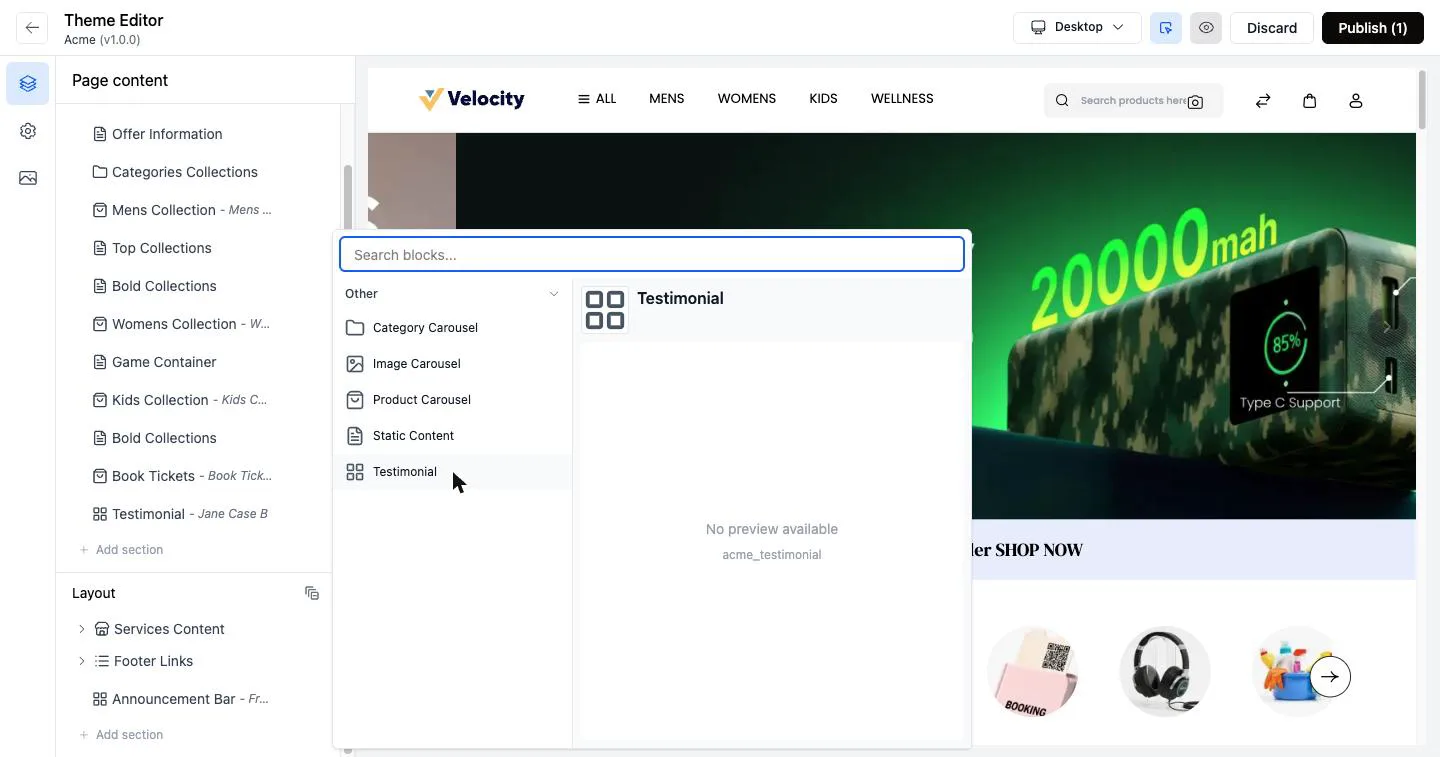
Registering section types
List the types the theme offers under customize.sections in its entry in config/themes.php. Built in types are listed as SectionTypeEnum cases, your own as classes. The order is the order of the Add section picker.
use Webkul\Theme\Enums\SectionTypeEnum;

'acme' => [
    'name' => 'Acme',
    'views_path' => 'resources/themes/acme/views',
    // ...
    'customize' => [
        'sections' => [
            SectionTypeEnum::IMAGE_CAROUSEL,
            SectionTypeEnum::PRODUCT_CAROUSEL,
            SectionTypeEnum::CATEGORY_CAROUSEL,
            SectionTypeEnum::FOOTER_LINKS,
            SectionTypeEnum::STATIC_CONTENT,
            SectionTypeEnum::SERVICES_CONTENT,
            \App\Sections\Testimonial::class,
            \App\Sections\AnnouncementBar::class,
        ],
    ],
],
Leave sections out and the theme offers every built in type.
Defining a section type
A section type extends Webkul\Theme\Sections\SectionType and declares its fields:
namespace App\Sections;

use Webkul\Theme\SectionSchema;
use Webkul\Theme\Sections\SectionType;

class Testimonial extends SectionType
{
    protected string $code = 'acme_testimonial';

    protected ?string $title = 'Testimonial';

    protected string $icon = 'icon-star';

    public function getFields(): array
    {
        return [
            ['key' => 'quote', 'type' => SectionSchema::TEXTAREA, 'label' => 'Quote'],
            ['key' => 'author', 'type' => SectionSchema::TEXT, 'label' => 'Author'],
            ['key' => 'photo', 'type' => SectionSchema::IMAGE, 'label' => 'Photo'],
        ];
    }
}| Property | Meaning |
|---|---|
$code | What sections of this type are stored under. Keep it unique, and prefix it with the theme's name. |
$title | The name the editors show. A translation key or plain text. |
$icon | Icon class drawn on the type's tile in Bagisto's appearance editor. |
$singleton | Only one section of this type per channel. |
$pinned | The section is fixed to the bottom of the page and cannot be moved. |
$layout | The section is drawn on every page by the layout, not by the home page. The visual editor lists it under Layout. |
Field types
Every field type Bagisto supports is editable in the visual editor:
| Type | Setting |
|---|---|
SectionSchema::TEXT | Single line of text |
SectionSchema::TEXTAREA | Longer text |
SectionSchema::NUMBER | Whole number |
SectionSchema::IMAGE | Image from the section media library or an upload |
SectionSchema::CODE | Code editor; set 'language' => 'html' or 'css' |
SectionSchema::REPEATER | List of field groups; nest them under 'fields', label the add button with 'add_label' |
SectionSchema::FILTERS | Product or category filters; list the allowed filters under 'keys' |
Drawing a home page section
Ship a view named after the type's code in the theme's views:
resources/themes/acme/views/sections/acme_testimonial.blade.phpIt receives the section as $section and its settings as $data:
<figure class="acme-testimonial">
    @if (! empty($data['photo']))
        <img src="{{ bagisto_theme_storage()->url($data['photo']) }}" alt="">
    @endif

    <blockquote>{{ $data['quote'] ?? '' }}</blockquote>
    <figcaption>{{ $data['author'] ?? '' }}</figcaption>
</figure>
With Bagisto Visual installed, its home page draws each section through this view, marks it so merchants can click it in the preview, and shows their unpublished changes while they edit. A type without a view draws nothing, without an error, so check each one renders.
Bagisto's own home page only draws the built in types. A theme that must show its own types on stores without Bagisto Visual draws its home page itself, as described next.
Images on Bagisto 2.4
bagisto_theme_storage() arrives in 2.5.0-beta3. Bagisto 2.4 stores image paths starting with storage/, which asset($data['photo']) turns into a URL. A theme supporting both can check function_exists('bagisto_theme_storage').
If the theme draws its own home page
A theme may keep its own home/index.blade.php, usually a copy of Bagisto's with a case added for each of its types. Its view wins over the one Bagisto Visual ships, and the visual editor still edits its sections and previews drafts. To let merchants select a section by clicking it in the preview, the element drawing each section has to carry the section's id.
Bagisto's stock home page already marks its sections, but only when $preview is set, which Bagisto does on its own appearance preview and not in the visual editor. In your copy, mark them whenever Bagisto is previewing instead:
{{-- Bagisto's stock home page --}}
@php ($marks = ($preview ?? false) && ! $section->getTypeInstance()?->rendersInLayout())

{{-- Your theme's copy --}}
@php ($marks = app(\Webkul\Theme\Repositories\SectionRepository::class)->isPreviewing() && ! $section->getTypeInstance()?->rendersInLayout())
The markup it guards stays as it is:
@if ($marks)
    <div
        data-section-id="{{ $section->id }}"
        data-section-name="{{ $section->name }}"
    >
@endif
Your own types are then drawn and marked like the built in ones, for example with @case ('acme_testimonial') @include('shop::sections.acme_testimonial', ['data' => $data]) in the copy's @switch.
Drawing a section on every page
A type with $layout = true is drawn by the theme's layout. Query it by type and mark it the same way, for example in a partial of the layout:
@inject('sectionRepository', \Webkul\Theme\Repositories\SectionRepository::class)

@php
    $channel = core()->getCurrentChannel();

    $announcements = $sectionRepository->findAllOfType(
        'acme_announcement',
        $channel->id,
        $channel->theme,
        app()->getLocale()
    );
@endphp

@foreach ($announcements as $announcement)
    <div
        class="acme-announcement"
        @if ($sectionRepository->isPreviewing())
            data-section-id="{{ $announcement->id }}"
            data-section-name="{{ $announcement->name }}"
        @endif
    >
        {{ $announcement->options['message'] ?? '' }}
    </div>
@endforeach
While a merchant edits, findAllOfType() returns their unpublished changes, and publishing a layout section refreshes the cache of every page.